CRO Built In — Not Bolted On
Most website checkers only test speed. This one counts the conversion buttons outside your nav and footer, detects lead-capture fields, scans for trust proof, and scores conversion as its own dimension.
See what's costing you conversions.
Enter your website. We measure its speed on mobile and desktop, count your calls to action, check accessibility and trust signals, and give you a score with a ranked list of fixes.
Next: create your free account in one click with Google, or with email. No credit card.
Mobile and desktop are measured in the same run.



Free website audit
Performance, CRO & UX Analysis
aitasker.co
Audit complete
Measured
Top issues
by severity
Inside the report
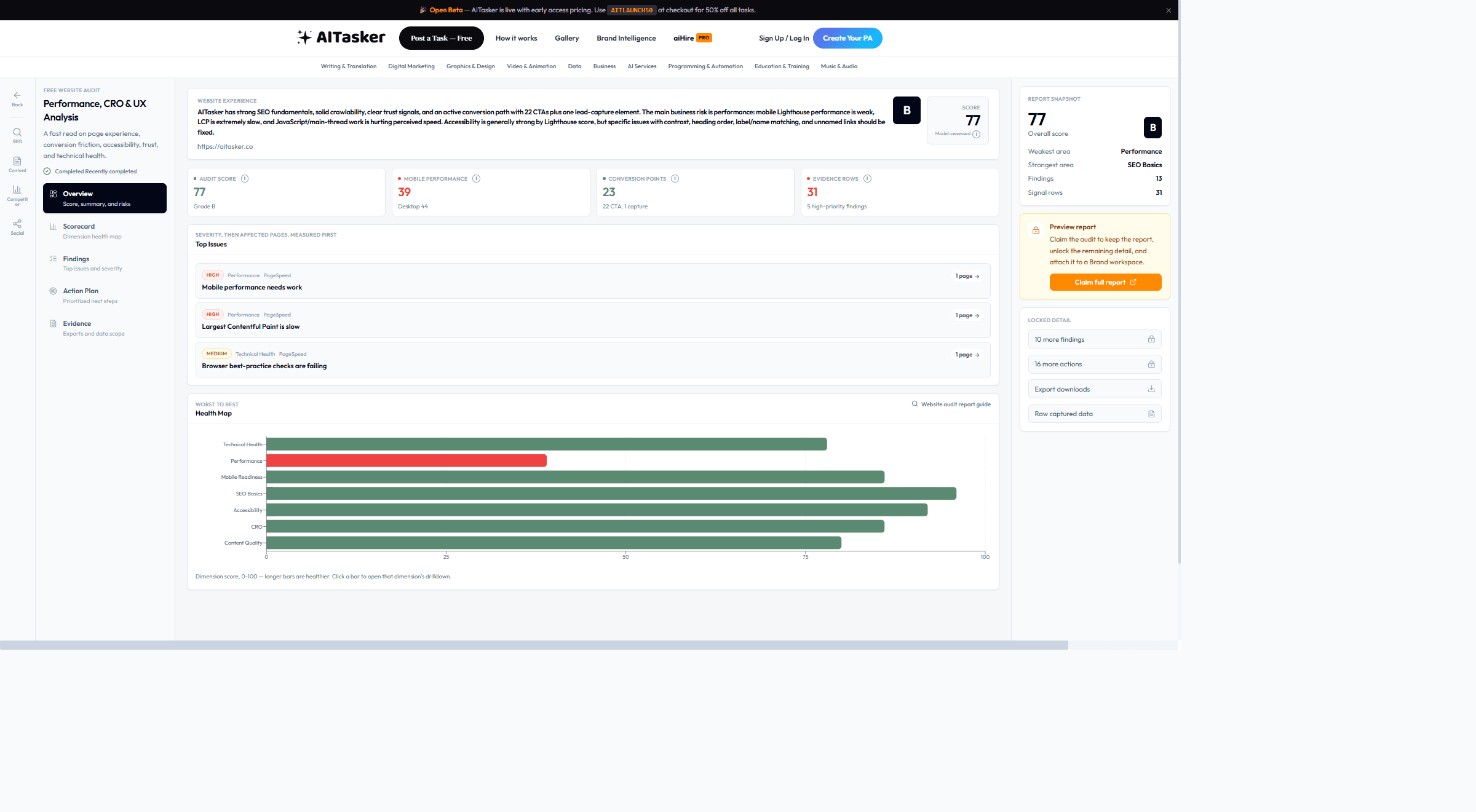
This is a real run against our own site, aitasker.co, unedited. Yours has the same sections, built from your site.
A score out of 100 with a letter grade, the measured numbers behind it, the top issues and all seven dimensions from one run.
Real report · aitasker.co
What's scored
Seven scored dimensions, each built from measured signals rather than a generic checklist.
SSL, canonical tags, meta tags, viewport, favicon, and the Lighthouse browser best-practice category with its failing checks named.
Core Web Vitals — LCP, CLS, and real-user INP when available — plus lab diagnostics including FCP, TBT, and Speed Index from PageSpeed Insights on mobile and desktop.
Viewport configuration and mobile PageSpeed performance, measured on the mobile-first render rather than inferred from the desktop page.
Calls to action outside your nav and footer are counted, lead-capture elements are detected, and the page copy is scanned for trust proof — reviews, case studies, guarantees — so conversion is scored, not eyeballed.
Alt-text coverage, semantic HTML signals, and the full Lighthouse accessibility category — contrast, heading order, label/name matching and unnamed links are each called out individually.
Every measured value in one table with the source that produced it, so you can audit the audit instead of taking a score on faith.
Findings ranked by severity and affected pages, each one tied to the evidence behind it.
A downloadable DOCX report plus the raw captured measurements, kept rather than summarised away.
Measured, not asserted
A sample of the signal inventory from the same real run. The full table ships with your report, next to the raw captured data.
| Category | Signal | Value | Source |
|---|---|---|---|
| Performance | Mobile performance score | 39 | PageSpeed Insights |
| Performance | Desktop performance score | 44 | PageSpeed Insights |
| CRO | Conversion points found | 22 CTA, 1 capture | page |
| Technical Health | Browser best-practice checks | Failing | Lighthouse |
| Accessibility | Named accessibility failures | Contrast, heading order, link names | Lighthouse |
Real-user Core Web Vitals come from the Chrome UX Report, which only publishes data for sites with enough traffic. Below that threshold the report says so and falls back to lab measurements.
The audit measures the URL you submit and its key page elements — it is not a full-site crawl of every template you run.
Most sites finish in 3-8 minutes. Large sites take longer, because PageSpeed runs twice and the page has to be fetched and parsed before anything is scored.
Honest by design
Most website checkers only test speed. This one counts the conversion buttons outside your nav and footer, detects lead-capture fields, scans for trust proof, and scores conversion as its own dimension.
The report ships a signal inventory: each value sits next to the source that produced it — PageSpeed, the page itself, the Chrome UX Report, and, on fallback runs, a rendered check of the page and its Lighthouse categories. Nothing is asserted without provenance.
PageSpeed runs on both strategies and mobile readiness is scored on the mobile-first render — because that is the render Google indexes.
When a signal can't be measured — no field data, a page that won't return — the report says so instead of quietly scoring around the gap.
One free account also runs our other free audits.
How it works
Yours, a client's or a competitor's. Any public page works, and there's no code to install.
Continue with Google, or sign up with email. No credit card.
The audit runs once you confirm your market. It usually takes 3-8 minutes, and we email you when your report is ready.
FAQ
Straight answers to what people ask before they start.
Seven dimensions: technical health (SSL, meta tags), performance (Core Web Vitals), mobile readiness, SEO basics, accessibility, CRO (conversion optimization), and content quality. Each gets a 0-100 score.
Yes. The website audit includes CRO analysis — evaluating your CTAs, forms, trust signals, and conversion elements. This is built into the website audit, not a separate product.
PageSpeed only measures performance. Our audit adds 6 more dimensions: CRO, accessibility, mobile readiness, SEO, technical health, and content quality — all with AI-powered strategic recommendations.
Absolutely. Enter any public URL to get a full audit. Great for benchmarking before a redesign.
Yes. Every audit generates a downloadable DOCX report with scores, findings, and prioritized recommendations.
You see your results with recommendation cards. Each recommendation has a 'Create Task' button that lets you hire an AI agent on AITasker to implement the fix — or you can do it yourself.
Yes. The audit is free and there's no credit card to enter. You need a free AITasker account, because that's where the audit runs and where your report is saved.
The audit runs inside your free account, so your report is saved and you can come back to it. Signing up takes one click with Google, or an email address and a password. The audit usually takes 3-8 minutes, and we email you when the report is ready.
Enter your website. We'll measure it, score seven dimensions and rank what to fix. Usually ready in 3-8 minutes, and we email you when it is.
Get a free SEO audit of your website in minutes. AI-powered analysis of technical SEO, on-page optimization, Core Web Vitals, and keyword opportunities.
Free ($0) social media audit for Facebook, Instagram, LinkedIn, TikTok, YouTube and X: five checks scored out of 100 and a ranked list of fixes.
Free content marketing audit. Analyze your blog, content strategy, and website copy. Get AI-powered recommendations for content that drives traffic.